



New Arrival at BINUS Computer Engineering Lab at MIS: Meet the Snapmaker U1 4-Toolhead 3D Printer—Multi-Color, Multi-Material, and High-Temp Engineering Ready
Multi-Polymer Prototyping (PLA, PETG, ABS, ASA & TPU), and Enclosed Chamber Capabilities
A Major Prototyping Upgrade for Computer Engineering Laboratory at Maker Innovation Space (MIS)

Snapmaker U1 with Chamber, https://shop.snapmaker.com/products/top-cover-for-snapmaker-u1
Students, lab assistants, and researchers visiting the Maker Innovation Space (MIS) at the BINUS University Computer Engineering Laboratory now have a major new fabrication tool on the workbench: the Snapmaker U1 4-Toolhead 3D Printer, outfitted with its enclosed chamber Top Cover upgrade.
Anyone who has built robot chassis, sensor housings, or capstone prototypes on conventional single-nozzle 3D printers knows their built-in limitations. Standard single-extruder machines lock you into one rigid plastic color and one melting temperature per print—and even single-nozzle multi-color filament switchers (AMS/MMU style) have to cut, retract, and purge melted plastic into a waste bin on every layer change, tripling print times and generating piles of “filament poop” (Snapmaker, 2026a, 2026b). By bringing four independent direct-drive toolheads together with a draft-free heated/enclosed build chamber, the Snapmaker U1 transforms what BINUS Computer Engineering students can fabricate in a single print job.
Step 1: What’s New? Core Architecture & Key Features of the Snapmaker U1
Rather than feeding four filaments into a single shared hotend, the Snapmaker U1 is built from the ground up as a true physical toolchanger across a generous 270 × 270 × 270 mm build volume (Snapmaker, 2026b). Three core architectural upgrades define the machine:
- 4 Independent Direct-Drive Toolheads (SnapSwap™ Toolchanger System): The U1 houses four completely separate direct-drive extruders and 300 °C stainless-steel hotends (featuring thermal-isolation heat breaks and up to 32 mm³/s volumetric flow rate) parked on a rear tool rack (Snapmaker, 2026b; 3DJake, 2026). Using steel-ball kinematic couplings and a motorless mechanical locking mechanism—validated for over 1,000,000 continuous swaps—the gantry docks, locks, and switches toolheads in roughly 5 seconds (10–12 seconds including prime-tower stabilization), keeping each filament spool pre-loaded at its own independent nozzle temperature (Snapmaker, 2026a; 3DBite, 2026).
- High-Speed CoreXY Kinematics & Automated Multi-Tool Calibration: Driven by a CoreXY motion system with lightweight, rigid carbon-fiber X-axis rails, the U1 reaches print and travel speeds up to 500 mm/s and 20,000 mm/s² acceleration (Snapmaker, 2026a, 2026b). Running Klipper-based firmware with accelerometer Input Shaping, Pressure Advance, automatic mesh bed leveling, and automated multi-tool XYZ offset calibration, the U1 aligns all four nozzles within ±0.04 mm repeatability—preventing layer shifts or color offsets across multi-head prints (3DJake, 2026).
- Added Enclosed Chamber / Top Cover Upgrade: Combined with its side panels, front glass door, and 100 °C heated PEI spring-steel bed, the newly installed Snapmaker U1 Top Cover creates a sealed polycarbonate chamber that traps radiated bed heat up to 50 °C, automatically toggles between high-temperature heat retention and low-temperature exhaust cooling, and passes chamber air through a three-stage filtration system (G3 pre-filter + H12 HEPA + coconut-shell activated carbon) to capture ultrafine particles and VOCs while keeping noise under 50 dB (Snapmaker, 2026c; IRIS Robotics, 2026).
Step 2: True Multi-Color Printing (Fast, Clean & Minimal Waste)
While single-nozzle filament switchers (such as AMS or MMU units) can print multiple colors, they suffer from a severe mechanical bottleneck: every time a layer switches from black to white, the printer must halt, cut the filament, retract it all the way out of the hotend, push the new color in, and flush 30–60 mm of molten transition plastic out a purge chute. On detailed multi-color models, those swaps take 40 to 90 seconds per change and frequently waste 3× to 4× more filament than the actual part weighs (Snapmaker, 2026d; 3DBite, 2026).
The Snapmaker U1 eliminates that penalty by assigning one dedicated nozzle per color (Snapmaker, 2026b):
- Zero Retraction & Up to 80–85% Less Waste: Because all four filaments stay loaded right at their own melt zones, switching colors takes only ~5 seconds and requires only a tiny ~4 g prime tower to clear minor standby ooze—eliminating purge chutes and slashing material waste by up to 80–85% (Snapmaker, 2026a; 3DBite, 2026).
- Zero Color Bleeding & Crisp Legend Labels: Without shared melt chambers, dark pigments like carbon black or red never stain translucent or white sections—making it effortless to print crisp port labels, button icons, color-coded wire routing channels, and status-LED diffusers directly into device housings.
Step 3: The Real Superpower — True Multi-Material Printing (Combining PLA, PETG, ABS, TPU & More)

Snapmaker U1, https://shop.snapmaker.com/products/snapmaker-u1-3d-printer
For Computer Engineering students and researchers, multi-material printing is far more impactful than color alone. Single-nozzle multi-filament systems struggle or jam when mixing polymers with different melting temperatures (such as PLA at ~210 °C and ABS/PC at ~260–280 °C), because residual high-temperature polymer clogs the nozzle during lower-temperature extrusion, while trace cross-contamination weakens layer adhesion (Snapmaker, 2026b).
Because the Snapmaker U1 uses four thermally independent toolheads, each nozzle runs at its own exact target temperature with zero cross-contamination—unlocking functional multi-polymer assemblies in a single print:
- Rigid Chassis + Flexible Hinges & Gaskets (PLA / PETG / ABS + TPU ≥ 90A): Combine stiff structural plastics (PLA, PETG, or ABS) with flexible TPU (≥ 90A Shore hardness) in one uninterrupted job to print rigid sensor enclosures with integrated rubber weather gaskets, vibration-damping IMU mounts, living hinges, or soft-touch robotic gripper pads (Snapmaker, 2026a, 2026b).
- Zero-Scar Breakaway or Water-Soluble Supports (PLA + PETG or PVA): In standard single-material printing, supports must leave a 0.2 mm air gap so they can be snapped off—leaving rough, sagging overhangs. Because PLA and PETG are chemically incompatible and do not fuse permanently together, you can use Toolhead 2 loaded with PETG as a 00 mm Z-gap support interface under a PLA part (or vice versa), peeling supports away cleanly to leave glass-smooth undersides—or use water-soluble PVA for trapped internal fluid or cable ducts (Snapmaker, 2026a; 3DJake, 2026).
- Multi-Property Engineering Composites (ASA + PAHT-CF or Dual-Shore TPU): Pair UV-resistant ASA outer shells with high-strength carbon-fiber nylon (PAHT-CF) structural ribs, or blend TPU 95A and TPU 90A for graded mechanical compliance without glue or fasteners (Snapmaker, 2026a).
Step 4: High-Temperature Engineering Materials Without Warping (The Added Enclosure)
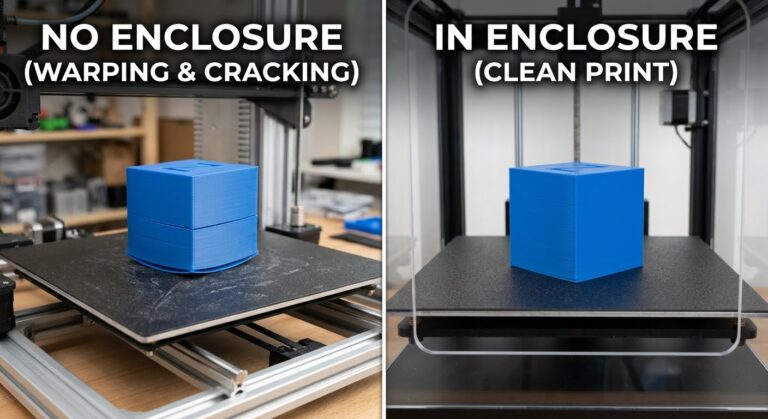
Example of Printed Product, Generated using Nano Banana 2
Standard PLA is great for quick visual mockups, but it softens around 55–60 °C—meaning a PLA motor bracket or dashboard sensor case left inside a hot car, near a power supply, or outdoors in Jakarta sunlight will warp and fail. To build durable functional hardware, engineers turn to ABS, ASA (UV- and weather-resistant), Polycarbonate (PC), and Nylon (PA).
| Why the Added Top Cover Enclosure Eliminates Warping & Delamination
• The Open-Frame Problem: High-temperature polymers like ABS and ASA are extruded at 260–280 °C onto a 100 °C heated bed. On an open-frame printer, cool room air causes upper layers to contract faster than the bottom layers—generating internal shear stress that peels corners off the build plate (warping) and splits weak layer bonds (delamination). |
Step 5: Comparison Table & Capstone Project Ideas for BINUS MIS
The table below compares the newly installed Snapmaker U1 (4-Toolhead + Top Cover) against conventional printers students may have used previously (Snapmaker, 2026a, 2026c; 3DBite, 2026):
| Capability / Metric | Standard Single-Nozzle Printer | Single-Nozzle Switcher (AMS-Style) | Snapmaker U1 (4-Toolhead + Enclosure) |
| Color / Material Change Speed & Waste | Manual pause & spool swap only; 1 material per job | Slow (40–90 s per swap); heavy purge waste (“filament poop”) | Ultra-fast (~5 s swap, 10–12 s w/ prime); up to 80–85% less waste (~4 g tower) |
| True Multi-Material (PLA + PETG + TPU + ABS) | Not supported automatically | Limited (same nozzle temp; soft TPU jams; cross-contamination) | Full native support across 4 independent 300 °C nozzles (rigid + flex + breakaway) |
| High-Temp Materials (ABS / ASA / PC / PA) | Prone to corner warping & layer splitting on open beds | Requires enclosed model; single-material only | Supported warp-free via 100 °C bed + 50 °C passive Top Cover |
| Best BINUS CE-LAB Lab Use Cases | Fast single-color PLA draft mockups & simple brackets | Decorative multi-color PLA figurines & signage | Functional IoT enclosures w/ TPU seals, robot grippers, zero-scar jigs & ASA drone parts |
Project Ideas for BINUS Computer Engineering Students at CE-LAB MIS
Ready to put the Snapmaker U1 to work on your lab practicum, competition robot, or thesis prototype? Here are four high-impact ways to leverage its 4-toolhead enclosed setup:
- Weatherproof IoT & Smart Classroom Sensor Housings: Print an ASA or PETG outer enclosure with a TPU 95A perimeter gasket, strain-relief cable grommets, and color-coded status-LED bezels fused into a single watertight assembly.
- Robotics End-Effectors & Compliant Mechanisms: Fabricate lightweight ABS servo brackets and linkage arms bonded directly to high-friction TPU gripper fingertips or shock-absorbing rover bumpers.
- Precision PCB Test Jigs & Bed-of-Nails Fixtures: Use PLA + PETG zero-gap breakaway support interfaces so pogo-pin alignment cavities and snap-fit PCB retention clips print with clean, dimensionally accurate undersides (±0.04 mm toolhead alignment) requiring zero sanding.
- Outdoor Drone Frames & High-Heat Electronics Mounts: Use the 50 °C enclosed chamber to print warp-free ABS or ASA motor mounts, LiDAR turrets, and power-regulator shrouds that resist solar UV exposure and high operating temperatures.
| CE-Lab & MIS Guidelines & Machine Booking Reminder
Before starting a multi-material or high-temperature print on the Snapmaker U1 at Maker Innovation Space (MIS), please check in with the Computer Engineering Lab assistants to confirm filament compatibility (1.75 mm diameter; TPU ≥ 90A Shore hardness; hardened nozzles required for carbon/glass-fiber filaments), verify Snapmaker Orca / OrcaSlicer multi-tool profiles, and reserve your print slot—and remember to allow the Top Cover’s 10-minute post-print HEPA/carbon filtration cycle to finish after ABS/ASA/PC/PA jobs before opening the chamber. |
References
3DBite. (2026, April 24). Snapmaker U1 tool changer 3D printer: Full specifications, tool swap speed, and Top Cover analysis. https://3dbite.com/snapmaker-u1-tool-changer-3d-printer/
3DJake International. (2026). Snapmaker U1 technical specifications: CoreXY kinematics, 300 °C hotends, ±0.04 mm calibration, and material compatibility. https://www.3djake.com/snapmaker/u1
IRIS Robotics. (2026). Top Cover for Snapmaker U1 with G3, H12 HEPA, and activated carbon filtration. https://irisrobotics.eu/en/p/top-cover-snapmaker-u1
Snapmaker. (2026a). Snapmaker U1 toolchanger 3D printer: SnapSwap™ 4-toolhead system, multi-material showcase, and product gallery. https://www.snapmaker.com/en/snapmaker-u1
Snapmaker. (2026b). Snapmaker U1 official FAQ: Build volume (270 × 270 × 270 mm), 500 mm/s CoreXY speed, 300 °C nozzle, 100 °C heated bed, and TPU ≥ 90A guidelines. https://wiki.snapmaker.com/en/FAQ/u1
Snapmaker. (2026c). Top Cover for Snapmaker U1: Passive heat retention up to 50 °C, three-stage air filtration, and post-print VOC clearance protocol. https://eu.snapmaker.com/products/top-cover-for-snapmaker-u1
Snapmaker. (2026d). Snapmaker U1 press kit: 5-second toolhead swaps and waste reduction benchmarks. https://press.snapmaker.com/
Tom’s Hardware. (2025, August 19). Snapmaker U1 review: An affordable tool changer for all. https://www.tomshardware.com/3d-printing/snapmaker-u1-review
Comments :